
In a previous post about deploying PostgreSQL in my Kubernetes cluster, I shared details and insights. After my initial deployment, I was able to use the service successfully without encountering any issues. It was a valuable learning experience, and I thoroughly enjoyed every aspect of the process.
A few months after the deployment, I decided to upgrade my PostgreSQL and noticed that Bitnami had introduced a new subscription plan for their database instances. The one I was using had moved to the legacy section, which raised concerns about long-term support and potential security issues. To address this, I decided to transition to a sustainable deployment of PostgreSQL independently, without relying on Bitnami’s services.
In this article, I will explain how I accomplished this, focusing on modernising a self-hosted password manager with Longhorn, AWS SES, and private Tailscale access.
Update Notice (2025)
As I mentioned, this post is an updated version of the earlier Bitnami-based deployment guide.
Since Bitnami PostgreSQL images and charts are now restricted or outdated, this migration uses official PostgreSQL containers, native Kubernetes manifests, and Longhorn storage, with AWS SES for email and Tailscale for secure private access.
Outline
This guide walks through the complete process of migrating a Vaultwarden setup from Bitnami Helm charts to a clean, native PostgreSQL + Longhorn + Kubernetes architecture.
The new configuration improves security, maintainability, and control by leveraging:
- PostgreSQL 17 (official image, StatefulSet)
- Vaultwarden (Bitwarden-compatible server)
- Longhorn persistent storage with S3 offsite backups
- AWS SES for reliable email notifications
- Tailscale VPN for private, encrypted access
This modernised stack is production-ready, entirely self-hosted, and easily maintained.
Architecture Overview
This section provides a comprehensive overview of the architecture, outlining its key components and structural design. It aims to give a clear understanding of the overall layout and functionality.
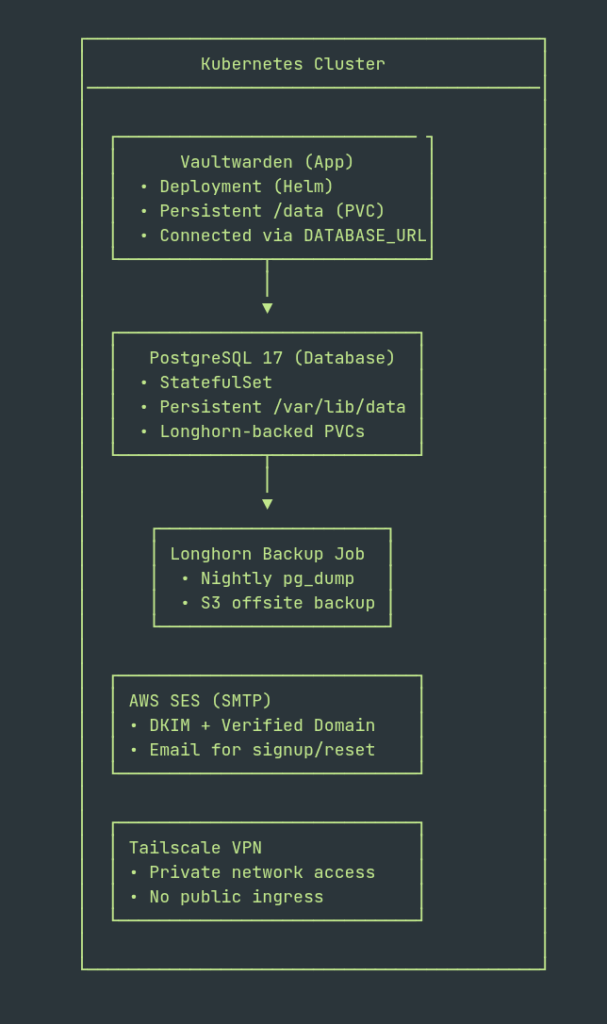
Explanation
- Vaultwarden Deployment: runs statelessly; persists data via Longhorn volume mounted at
/data. - PostgreSQL StatefulSet: serves as the persistent backend for Vaultwarden, using Longhorn PVCs.
- Longhorn + S3 Backups: nightly backups from a
pg_dumpCronJob + Longhorn’s own S3 replication. - AWS SES SMTP: provides reliable transactional email delivery.
- Tailscale VPN: restricts access to trusted devices only — no public ingress exposure.
1. What is the reason for migration?
The Bitnami PostgreSQL Helm chart, once widely used, now restricts access to images and updates.
Migrating to the official PostgreSQL container provides:
- Transparent security updates
- Lightweight and minimal image footprint
- Easier debugging and version upgrades
- Simpler storage and backup management with Longhorn
2. PostgreSQL Deployment (StatefulSet)
The PostgreSQL 17 database is deployed as a StatefulSet in the postgresql namespace. Storage is managed by Longhorn, with credentials securely stored in Kubernetes secrets.
Example Helm values (postgres-values.yaml)
image:
  repository: postgres
  tag: 17

primary:
  persistence:
    enabled: true
    storageClass: longhorn
    accessModes: [ "ReadWriteOnce" ]
    size: 5Gi

auth:
  username: vaultwarden
  password: <db-password>
database: vaultwardenDeploy PostgreSQL
helm install postgres-vw oci://registry-1.docker.io/library/postgresql \
-n postgresql -f postgres-values.yaml3. Vaultwarden Database Connection
Create a secret for the database URL:
apiVersion: v1
kind: Secret
metadata:
  name: vaultwarden-db-secret
  namespace: vaultwarden
type: Opaque
data:
DATABASE_URL: <base64-encoded postgresql://vaultwarden:<password>@postgres-vw.postgresql.svc.cluster.local:5432/vaultwarden>Verify:
kubectl get secret vaultwarden-db-secret -n vaultwarden -o yaml4. Vaultwarden Deployment (Helm)
Vaultwarden utilises the Gabe565 Helm chart, which is configured for persistence, SMTP, and private TLS ingress.
Example values (vaultwarden-values.yaml)
image:
  repository: vaultwarden/server
  tag: 1.33.2-alpine

replicaCount: 1

persistence:
  data:
    enabled: true
    storageClass: longhorn
    accessMode: ReadWriteOnce
    size: 5Gi
    mountPath: /data

envFrom:
  - secretRef:
      name: vaultwarden-db-secret
  - secretRef:
      name: vaultwarden-admin-secret
  - secretRef:
      name: smtpsecrets

env:
# Vaultwarden basics
  - name: SIGNUPS_ALLOWED
    value: "true"
  - name: ROCKET_PORT
    value: "8080"
  - name: ROCKET_ADDRESS
    value: "0.0.0.0"
  - name: SMTP_ENABLED
    value: "true"
# --- SMTP via AWS SES ---
  - name: SMTP_HOST
    value: "email-smtp.eu-west-*.amazonaws.com"
  - name: SMTP_PORT
    value: "Value"

# SES uses STARTTLS on 587
  - name: SMTP_SECURITY
    value: "starttls"
  - name: SMTP_FROM
    value: "no-reply@example.com"

# Pull username/password from the smtpsecrets Secret
  - name: SMTP_USERNAME
    valueFrom:
      secretKeyRef:
        name: smtpsecrets
        key: smtp_user
  - name: SMTP_PASSWORD
    valueFrom:
      secretKeyRef:
        name: smtpsecrets
        key: smtp_pass

#----Domain Name----
  - name: DOMAIN
value: "https://vaultwarden.example.com"Deploy:
helm repo add gabe565 https://charts.gabe565.com
helm upgrade --install vaultwarden gabe565/vaultwarden \
-n vaultwarden -f vaultwarden-values.yaml5. Admin Token Configuration
While an Argon2-hashed token was attempted in YAML, Kubernetes rejected the format.
The final working solution was to create the admin secret directly via CLI.
kubectl create secret generic vaultwarden-admin-secret -n vaultwarden \
--from-literal=ADMIN_TOKEN='my_secure_admin_token'For the secret, Kubernetes will encode it to Base64, so plain text is acceptable here.
To confirm:
kubectl exec -it -n vaultwarden deploy/vaultwarden -- printenv ADMIN_TOKENAfterwards, the secret can be exported for reference or future use:
kubectl get secret vaultwarden-admin-secret -n vaultwarden -o yaml > vaultwarden-admin-secret.yaml6. PostgreSQL Backups
6.1 Automated Daily Backups
A CronJob performs nightly SQL dumps using. pg_dump:
apiVersion: batch/v1
kind: CronJob
metadata:
  name: pg-dump-vaultwarden
  namespace: postgresql
spec:
  schedule: "0 2 * * *"
  jobTemplate:
    spec:
      template:
        spec:
          containers:
          - name: pg-dump
            image: postgres:17
            command:
              - /bin/sh
              - -c
              - |
                pg_dump -h postgres-vw.postgresql.svc.cluster.local \
                        -U vaultwarden vaultwarden \
                  > /backups/vaultwarden-$(date +%F_%H-%M-%S).sql
          volumes:
            - name: backup-vol
              persistentVolumeClaim:
                claimName: postgres-backup-pvc
restartPolicy: OnFailureRun manually:
kubectl create job --from=cronjob/pg-dump-vaultwarden pg-dump-test -n postgresql6.2 Backup PVC
apiVersion: v1
kind: PersistentVolumeClaim
metadata:
  name: postgres-backup-pvc
  namespace: postgresql
spec:
  accessModes:
    - ReadWriteMany
  storageClassName: longhorn
  resources:
    requests:
storage: 5Gi6.3 Debug and Manual Restore Pod
A reusable debug pod helps inspect backups or test restores. This is very useful, as it allows you to check at any time if the backups are okay, which will be very helpful.
apiVersion: v1
kind: Pod
metadata:
  name: pvc-debug
  namespace: postgresql
spec:
  containers:
    - name: debug
      image: postgres:17
      command: ["sh", "-c", "sleep infinity"]
      volumeMounts:
        - name: backup
          mountPath: /backups
  volumes:
    - name: backup
      persistentVolumeClaim:
        claimName: postgres-backup-pvc
restartPolicy: NeverUse:
kubectl exec -it -n postgresql pvc-debug -- ls /backups
kubectl delete pod pvc-debug -n postgresql6.4 Longhorn S3 Offsite Backup
Longhorn’s built-in backup feature replicates all PostgreSQL volumes to AWS S3 for disaster recovery.
In Longhorn UI:Settings → Backup Target → s3://<bucket-name>@<region>
This provides both local and off-site redundancy.
AWS SES Integration
Vaultwarden uses AWS Simple Email Service for account verification and password reset notifications.
- Verify your domain in SES and enable DKIM (3 CNAME records).
- Create SMTP credentials and store them as a Kubernetes secret.
kubectl create secret generic smtpsecrets -n vaultwarden \
  --from-literal=smtp_user='<SMTP_USER>' \
--from-literal=smtp_pass='<SMTP_PASS>'- Update the Vaultwarden values:
smtp:
  host: email-smtp.eu-west-2.amazonaws.com
  port: 587
  from: no-reply@example.com
  fromName: "Vaultwarden Administrator"
  existingSecret: smtpsecrets
  username:
    existingSecretKey: smtp_user
  password:
existingSecretKey: smtp_passSend a test email from the admin panel to verify that delivery is successful.
Once verified, email confirmation and password recovery will function automatically.
8. Private Access (Tailscale VPN)
Instead of public Ingress exposure, the setup is accessible only via Tailscale VPN.
All devices (desktop, laptop, mobile) that log in via Tailscale can securely access the Vaultwarden service without public DNS or open ports.
This design:
- Eliminates external attack surfaces
- Preserves TLS encryption internally
- Keeps the password manager private to the owner’s network
What to check
| Component | Status | Description |
|---|---|---|
| PostgreSQL StatefulSet | Running | Longhorn-backed, secure |
| Backup CronJob | Configured | Dumps verified under /backups |
| PVCs | Bound | RWX and RWO volumes |
| Longhorn S3 | Active | Automated offsite backups |
| Vaultwarden | Operational | Connected and accessible |
| SMTP | Working | AWS SES test confirmed |
| Admin Panel | Secure | Protected via admin token |
| Access | Private | Tailscale only |
10. Upgrading the Deployment
Vaultwarden
helm repo update
helm upgrade vaultwarden gabe565/vaultwarden \
  -n vaultwarden -f vaultwarden-values.yaml
kubectl rollout status deployment vaultwarden -n vaultwardenPostgreSQL
kubectl set image statefulset/postgres-vw postgres=postgres:18 -n postgresql
kubectl rollout status statefulset postgres-vw -n postgresqlInsights
1. Replacing Bitnami with native PostgreSQL simplifies both upgrades and debugging processes.
2. Creating Kubernetes secrets via the command line interface (CLI) results in more reliable Argon2 tokens.
3. Using Longhorn in combination with S3 provides backup redundancy both locally and remotely.
4. AWS Simple Email Service (SES) integrates seamlessly once DomainKeys Identified Mail (DKIM) and credentials are verified.
5. Tailscale access ensures the setup remains secure without any exposure to the public internet.
Conclusion
This migration establishes a robust, private, and self-maintainable Vaultwarden platform, leveraging Kubernetes’ capabilities to enhance scalability and manageability. This implementation seamlessly combines the flexibility of open-source software with the reliability of a production-grade infrastructure, ensuring high performance and security.
Key features of the architecture include: –
Modern PostgreSQL Backend: Utilising a PostgreSQL database ensures strong data integrity and supports complex queries, while providing efficient storage and retrieval of user credentials.
Persistent Longhorn Volumes with S3 Backups: Longhorn provides a cloud-native, distributed block storage solution that ensures data persistence across container restarts. Regular backups to Amazon S3 provide additional protection against data loss and facilitate easy recovery in the event of system failures.
Verified Email Functionality via AWS SES: By integrating with Amazon Simple Email Service (SES), the platform ensures that user email addresses are verified reliably, enhancing security and trustworthiness in account management processes.
Private Connectivity through Tailscale: Tailscale establishes secure, private connections between devices, allowing users to access their Vaultwarden instance without opening additional ports or exposing the service to the public internet, thus significantly increasing security. With this sophisticated architecture, Vaultwarden becomes a highly dependable and secure password management solution, allowing users to control their sensitive data fully.
This makes it an ideal choice for both long-term personal use and collaborative team environments, providing peace of mind in managing passwords efficiently and safely.
Further Reading
For reference, see the original post:
Deploying Bitnami PostgreSQL
That post details the legacy Bitnami-based setup, which this migration replaces with a modern and open-source equivalent.
